Your room feels wrong, the remote is covered in Japanese, and pressing the temperature arrows has not helped. Start with the operating mode: cooling, heating, dehumidifying and fan-only operation do different things.
This Japanese air conditioner remote guide is for renters, students and travelers using a typical home air conditioner. The labels below help you recognize functions; the exact model manual decides how those functions work.
What you will learn
- Which Japanese labels mean cool, heat, dry and fan.
- How to separate mode, temperature, airflow and timer controls.
- What to check before deciding the air conditioner is broken.
- What information to send your host or property manager.
Prepared by HarukaBase Editorial. Manufacturer references checked September 29, 2026. This is a general guide, not a test of your particular appliance.
Japanese Air Conditioner Remote: Buttons and Modes
First look for a dedicated mode button or a button that cycles through modes. Some remotes hide less-used controls under a sliding cover. Photograph the original display before making changes so you have a useful reference.
The essential labels, translated into English
Match the printed words rather than guessing from the button color. A large button is not always the power button, and similar-looking remotes can have different layouts.
| Japanese label | English meaning | What to look for |
|---|---|---|
| 運転 / 停止 | Start / stop | Separate buttons or one combined control. |
| 入 / 切 | On / off | Read nearby text: these can also be timer labels. |
| 運転切換 / モード | Change mode | Check which mode appears on the display. |
| 冷房 | Cool | For lowering room temperature. |
| 暖房 | Heat | For warming the room. |
| 除湿 / ドライ | Dehumidify / dry | For humidity; behavior varies by model. |
| 送風 | Fan | Air movement without active cooling or heating. |
| 自動 | Automatic | Its meaning depends on the control beside it. |
| 温度 | Temperature | Usually adjusted with up/down controls. |
| 風量 / 風向 | Fan speed / air direction | How strongly air blows / where it goes. |
| タイマー / 取消 | Timer / cancel | Read the model's timer instructions. |
The Panasonic CS-S225A manual illustrates many of these labels on an older Japanese remote. It is a reference example, not a claim that your unit has the same buttons or settings.
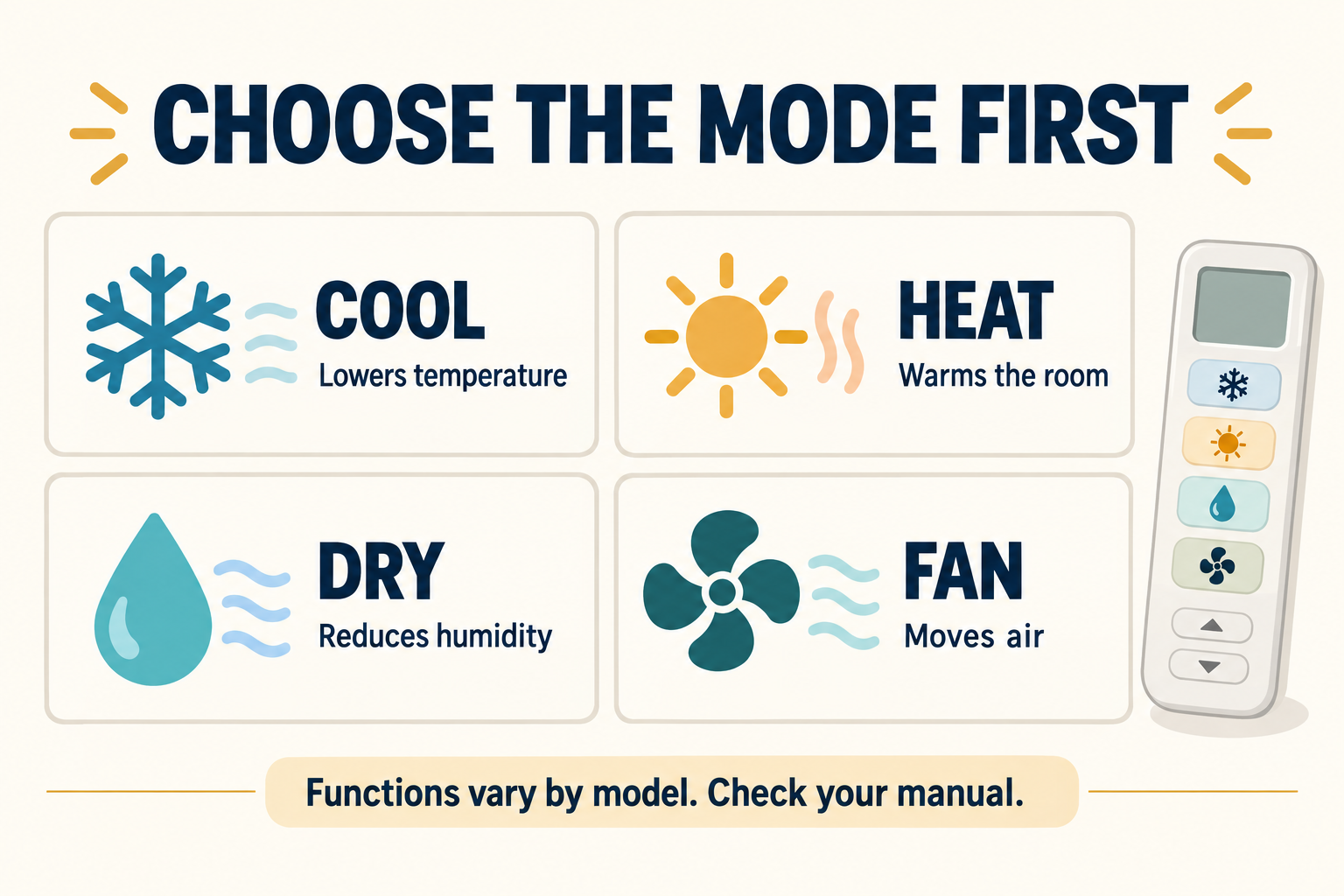
Choose the mode before changing the temperature
Use this order as a starting routine: identify the desired mode, check it on the display, then adjust temperature and airflow as the manual allows. On a remote with a mode-cycle button, pause after each press and read the selected mode.
Raising a number while still in cooling mode does not select heating. Likewise, fan-only mode cannot cool the room simply because the display shows a low number. If a hotel wall controller does not offer your desired mode, ask reception whether the system is centrally controlled.
Save this first-night check
- Too hot? Look for cooling: 冷房.
- Too cold? Look for heating: 暖房.
- Damp but not hot? Read the dry-mode instructions: 除湿 or ドライ.
- Only want air movement? Look for fan mode: 送風, if available.
Treat a set temperature as a target, not a measurement of the whole room. For a new rental, add an AC demonstration to your Japan apartment move-in checklist.
Cool vs. dry: why dry mode is not always cheaper
Cooling primarily lowers temperature; dry mode primarily removes moisture. Daikin explains that weak-cooling dehumidification can also cool the room, while reheat dehumidification warms the dried air again. Reheating uses additional energy, so the word “dry” is not a guarantee of a lower electricity bill. See Daikin's explanation of cooling, dehumidification and energy use.
A practical question is therefore “What does this model's dry setting do?” rather than “Which mode is always cheapest?” If the room is hot, choose a mode that actually provides the cooling you need. If it is already comfortable but humid, consult the dry-mode section of the manual.
Fan speed, air direction and the two meanings of auto
Fan speed and operating mode are separate choices. “Auto” beside fan speed lets the unit manage airflow; “auto” in the mode list lets it manage operation according to its own settings. Read the adjacent label before assuming both are the same.
Air direction changes where the airflow goes. If your remote offers a swing setting, use the documented control rather than forcing the motorized flap by hand. A useful comfort check is whether air is blowing directly onto your face or bed.
For example, imagine the room is cooling correctly but the desk feels drafty. Changing direction may address that problem without changing to another operating mode. This is a troubleshooting example, not a recommended setting for every apartment.
On timers, off timers and cancellation
An on timer starts operation later; an off timer stops it later. Some remotes use a clock time, while others use a delay. Check whether the screen is showing a time of day, a number of hours, or the temperature before adjusting it.
Look for the cancel control associated with the timer. Do not assume the main power button has removed every saved schedule. The Panasonic example linked above has its own timer-setting procedure; your remote may use a different sequence.
A useful handover question: “Is any timer already active, and how do I cancel it on this remote?” Ask this when moving into a furnished apartment or checking into accommodation.
Japanese Air Conditioner Remote: Fixing Common Problems
Describe what you can observe before trying a reset: a blank remote, no response from the unit, weak airflow, a flashing lamp, or a pause during heating. These are different symptoms and need different checks.
The remote changes, but the unit does not respond
For a typical infrared remote, point it toward the indoor unit with a clear path. Look for a response from the unit rather than relying only on the remote's display. If the display is faint or missing, check the batteries and their orientation against the manual.
Daikin's remote troubleshooting guide includes battery checks and model-dependent causes. In a rental, report damaged or leaking batteries to the manager instead of treating the remote as a repair project.
Before contacting the manager, collect:
- A clear photo of the remote and its current display.
- The indoor unit's model label, if safely visible.
- The mode you selected and whether the unit responded.
- Any flashing lamp or displayed error code.
A remote with new batteries can still be the wrong remote for that unit. Ask the host to confirm the pairing before buying a replacement or changing advanced settings.
Heating is selected, but warm air has stopped
A pause does not automatically mean a fault. Daikin's heating troubleshooting guidance describes both startup preparation and defrost operation as possible reasons warm air is temporarily absent.
Check that heating is actually selected, note how long the pause lasts, and compare it with your model's instructions. Repeatedly changing modes makes the sequence harder to observe. If operation does not recover as described, send the symptom record to the host or manager.
A useful report is “Heating is selected; the unit responded at 7:10, but there is still no warm airflow,” rather than “The remote does not work.” Do not open the unit or attempt refrigerant, wiring or outdoor-unit repairs.
The unit keeps running after you press stop
Some air conditioners carry out an internal cleaning or drying cycle after normal operation stops. Daikin documents this behavior in its internal-clean display guidance. A remaining fan sound can therefore have a different explanation from an active cooling or heating request.
Look up the model and any displayed cleaning label. Do not assume every unit that continues running is cleaning: an unfamiliar sound, error lamp or persistent unwanted operation still needs checking.
Internal cleaning also does not mean every part of the appliance is maintenance-free. Follow the owner's instructions for routine care. For a rented unit, ask who is responsible before using cleaning products or dismantling anything.
Find the exact manual and send a useful host message
Search the manufacturer's site using the indoor unit model, then compare the manual's remote illustration with the remote in your room. A remote model number alone may lead to a replacement accessory rather than the complete operating guide. Panasonic provides a manual search page; use the equivalent official support page for your brand.
Copy and adapt this message
Hello, could you send me the operating guide for the air conditioner in my room? I am trying to use [cooling/heating/dry mode]. The display currently shows [label], and the unit [responds/does not respond/pauses]. I have attached photos of the remote and model label. Is there a timer or building setting I should know about?
This original HarukaBase template is designed to reduce follow-up questions; it is not an actual customer case. For other apartment conversations, use our hotel and housing phrase tool.
Still planning your move? Explore HarukaBase housing support in Japan and the questions to prepare before choosing accommodation. For an appliance problem in an existing stay, your host or property manager is the first contact.
Japanese air conditioner remote: the quick summary
Read the mode first, then temperature, airflow and timers. Keep cool, heat, dry and fan separate in your mind, and never assume dry mode has the same behavior or cost on every model.
Save the label table, photograph the remote's original settings and keep the exact manual handy. When something seems wrong, a model number and a short symptom record are more useful than random button presses.